What exactly is xbox pc game pass (and why it matters)
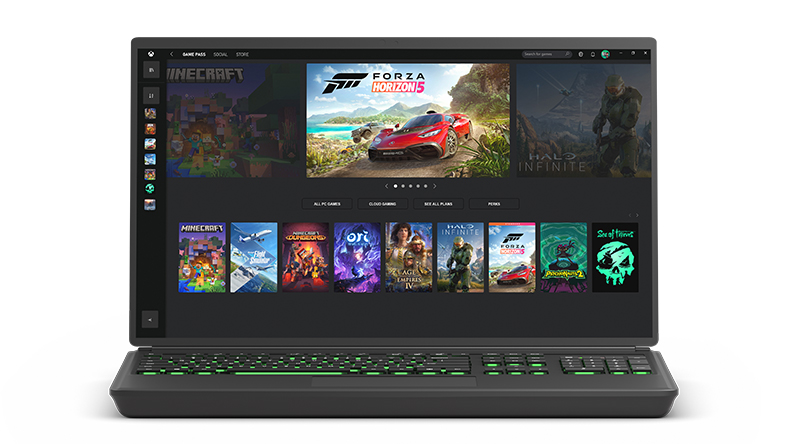
Let’s clear up what this is — and what it’s not. Xbox Game Pass is Microsoft’s gaming subscription that gives players access to a rotating catalog of games. The PC Game Pass tier is designed specifically for Windows users, offering a desktop-first experience.
- It lowers the cost barrier — no need to buy every game.
- It gives you permission to explore new genres without financial risk.
- It makes gaming more spontaneous — download, play, delete, repeat.
If you’re the kind of gamer who loves options, xbox pc game pass is your buffet.
How it actually works (from a PC gamer’s point of view)
- Subscribe to PC Game Pass via Microsoft’s website or directly in the Xbox app.
- Open the Xbox app on Windows — that’s your control center.
- Browse the library, hit “Install,” and the game downloads locally.
- Play while your subscription is active.
- Games that leave the catalog can still be purchased at a member discount.
No DRM chaos, no hidden hoops — it’s straightforward, and surprisingly smooth.
The good, the bad, and the smart trade-offs
The good stuff:
- Hundreds of games, including new releases.
- Day-one access for Microsoft exclusives.
- Built-in EA Play integration — that’s an extra library on top.
- Cloud saves and automatic updates.
- Affordable compared to buying individually.
The trade-offs:
- Games rotate in and out of the catalog.
- Once you cancel, access ends.
- Big titles can eat up your storage fast.
- Some console ports still feel clunky on PC.
So no, it’s not perfect — but for what it costs, it’s dangerously close.
Who it’s for (and who it’s not)
Best suited for:
- Gamers who love trying new things every week.
- Anyone exploring genres outside their comfort zone.
- Fans of first-party Microsoft franchises.
- PC players looking for maximum value.
Maybe skip it if:
- You’re loyal to one or two games year-round.
- Your PC hardware struggles with modern titles.
- You get attached when a game might rotate out.
If you’re a flexible gamer, this is easily one of the best subscriptions out there.
Key features worth using
- EA Play access — included by default.
- Member discounts for purchases.
- Day-one releases for first-party Microsoft games.
- Cloud syncing between devices.
- Regular updates and game patches automatically handled.
Pro tip: keep the Xbox app notifications on — it’ll alert you when new titles drop or when something’s about to leave the library.
Pricing and what you actually get
| Tier | Platform | Monthly Price* | What You Get |
|---|---|---|---|
| PC Game Pass | Windows PC | ~£9.99 / US $11.99 | Hundreds of PC games, EA Play access, day-one releases |
| Xbox Game Pass Ultimate | PC + Console + Cloud | ~£12.99 / US $16.99 | All PC features plus console library and cloud streaming |
*Prices may vary by region and promotions.
Now let’s break down value perception — because “cheap” doesn’t always mean “better.”
| Question | Answer |
|---|---|
| Is it cheaper than buying games individually? | Absolutely, if you play at least two or three games per month. |
| What if I only play one game at a time? | Buying that game outright may cost less long-term. |
| Do I lose my games if I cancel? | Access, yes. Save files, no — they stay on your drive. |
| Can I still buy the games I love? | Definitely, and you’ll usually get a 10–20% member discount. |
Final thoughts
If you’re a PC gamer who values flexibility, discovery, and savings, xbox pc game pass is an easy recommendation. It gives you the thrill of constant discovery, the comfort of a curated library, and the bonus of playing major titles the day they drop.
If you’re someone who sticks to one or two franchises, it might not be the best long-term deal — but even then, you can jump in for a month or two, binge-play everything new, and step away. It’s that flexible.
Here’s what to do next:
- Check if your PC meets the system requirements for your dream games.
- Sign up for the trial month (it’s often discounted or free).
- Download at least three completely different titles — mix genres.
- Track how much you’d normally spend buying those games.
- Ask yourself at the end of the month: did I just save money and have more fun?
Chances are, the answer will be yes — and suddenly, “nothing to play” will sound like a phrase from another lifetime.